(147)タイピング&マウス操作 腕素材|Typing & Mouse Hand Asset
Litaの作品を見つけてくれてありがとう!
Thanks for finding my work!
Preview Video
Download / Purchase
English Description
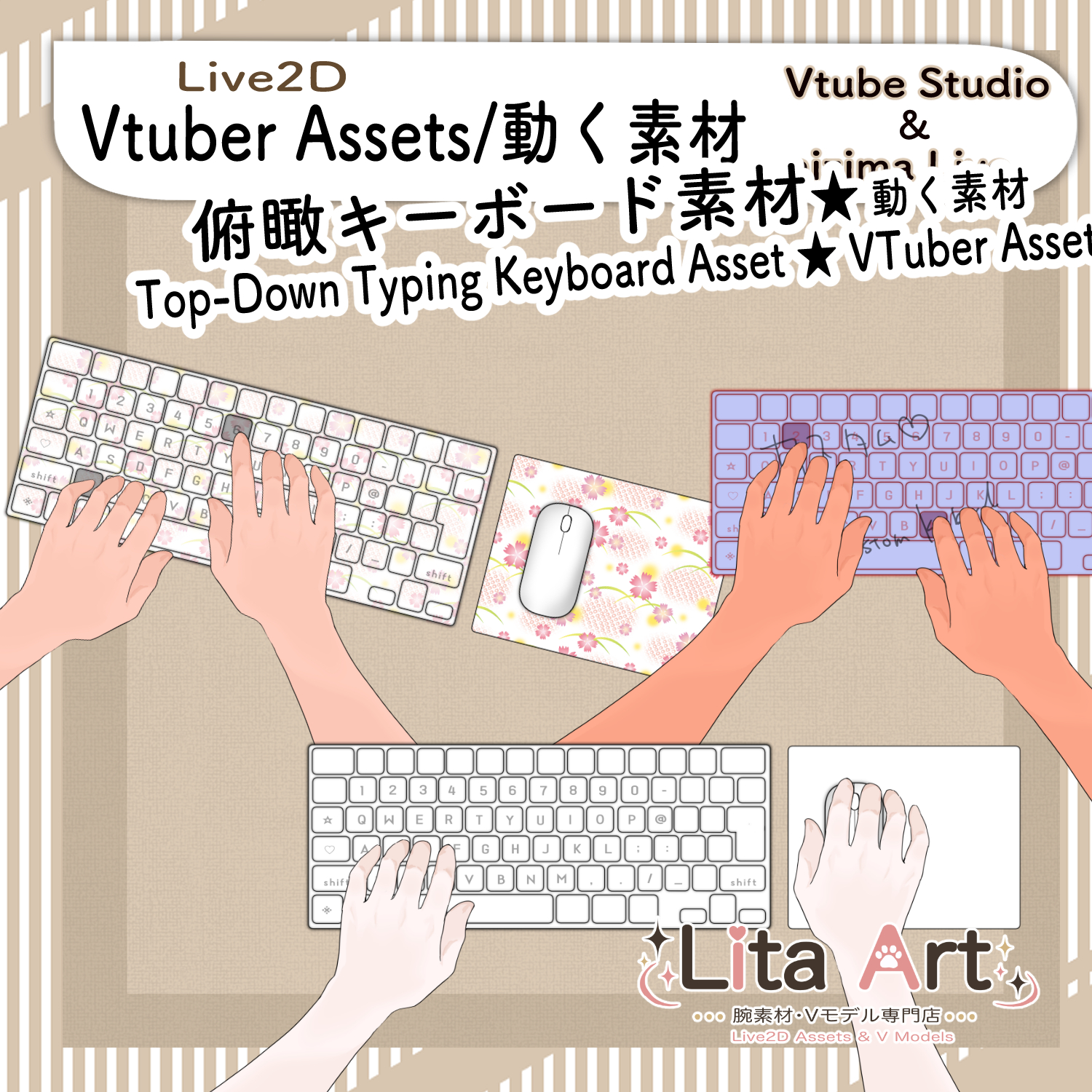
This Live2D item shows hands operating a keyboard and mouse.
・Number keys (0–9)
・Letter keys (A–Z)
・Shift / Ctrl / Alt / Space
are supported.
Keys on the left side of the keyboard move the left hand, and keys on the right side move the right hand.
This makes the typing motion look natural.
Right Hand Movement
① Right hand on the mouse
The right hand waits on the mouse.
When you press a key on the right side, the right hand moves to the keyboard and presses the key.
② Right hand on the keyboard
The right hand waits on the keyboard.
In this mode, the mouse can move without a hand on it.
When you click, the right hand moves to the mouse.
Switching Between the Two Modes
Use the middle mouse button to switch between these two right-hand positions.
Included Files
・Complete Live2D item set
・moc3
・model3.json
・textures, etc.
・Preconfigured keybind data
*For use with VTube Studio.
Keybind Settings
・0–9: Number key input
・A–Z: Letter key input
・Shift / Ctrl / Alt / Space: Operated by the left hand
・Keys to the left of 5 / T / G / B: Operated by the left hand
・Keys to the right of 6 / Y / H / N: Operated by the right hand
・Left Click: Left mouse click
・Right Click: Right mouse click
・Middle Click: Switch the right-hand home position
Mouse position ⇔ Keyboard position
・Shift + 1: Blue design
・Shift + 2: Pink design
・Shift + 3: Custom design
・Shift + 0: Reset
Custom Design
Shift + 3 is for a custom design.
Edit the artwork in texture00 to create your own design.
Customizable Parameters
Skin Color: Arm skin tone
Color: Keyboard and mouse pad color
日本語説明
この素材は、キーボードとマウスを動かしている手を表現できるLive2Dアイテムです。
・数字キー(0〜9)
・アルファベットキー(A〜Z)
・Shift / Ctrl / Alt / Space
に対応しています。
キーボードの左側のキーは左手、右側のキーは右手が動きます。
なので、タイピングしているような動きを自然に見せることができます。
右手の動き
① マウスを持っている状態
右手がマウスを持って待機します。
この状態で右側のキーを押すと、右手がキーボードの方へ動いてキーを押します。
② キーボードに手を添えている状態
右手がキーボードの上で待機します。
この状態では、マウスは手なしで動きます。
でも、クリックすると右手がマウスの方へ動きます。
切り替え方法
この2つの状態は、ミドルクリックで切り替えできます。
内容物
・Live2Dアイテム一式
・moc3
・model3.json
・texture など
・キーバインド設定済みデータ
※VTube Studioで使用できます。
キーバインド設定
・0〜9:数字キー入力
・A〜Z:アルファベットキー入力
・Shift / Ctrl / Alt / Space:左手で入力
・5 / T / G / B より左側のキー:左手で入力
・6 / Y / H / N より右側のキー:右手で入力
・左クリック:マウス左クリック
・右クリック:マウス右クリック
・ミドルクリック:右手の待機位置を切り替え
「マウスを持っている状態」⇔「キーボードに手を添えている状態」
・Shift + 1:Blueデザイン
・Shift + 2:Pinkデザイン
・Shift + 3:Customデザイン
・Shift + 0:Reset
カスタムデザイン
Shift + 3はカスタム用です。
texture00のイラストを編集することで、お好みのデザインに変更できます。
表情パラメータで変更可能なもの
Skin Color:腕の色
Color:キーボードとマウスパッドの色
Important Note
✅ Commercial use and editing are permitted.
✅ Credit is optional.
✅ Copyright is not waived.
✅ By using this product, you are deemed to have agreed to the Terms of Sale.
🔗 https://lita-art.net/terms-and-condition/
⚠️ There are no restrictions on use in adult-oriented / NSFW content.
Please use within the bounds of common sense.
Color Changes & Sound Effects
Some items support color changes and/or sound effects.
To change the color, adjust the “Color” parameter in the expression settings if available. If there is no “Color” parameter, change the color using the ArtMesh color settings.
Setup Guide:
🔗 https://lita-art.net/how-to-set-up/
Contact
Questions and consultations are accepted via DM.
Feel free to contact me ✨
X: https://twitter.com/LitaVtuber
Web: https://lita-art.net/contact-form/
ご利用について
✅ 商用利用・編集OK
✅ クレジット表記は任意
✅ 著作権は放棄していません
✅ ご利用の際は、利用規約に同意したものとみなします
🔗 https://lita-art.net/terms-and-condition/
⚠️ 成人向けコンテンツでの使用制限はありません。
常識の範囲内でご使用ください。
色変更・効果音について
一部のアイテムは、色変更や効果音に対応しています。
変更は、表情設定のパラメータ一覧に「Color」がある場合、その値を調整してください。「Color」がない場合は、アートメッシュの色設定から変更してください。
設定方法はこちら:
🔗 https://lita-art.net/how-to-set-up/
お問い合わせ
質問・ご相談はDMまでお気軽にどうぞ✨
X: https://twitter.com/LitaVtuber
Web: https://lita-art.net/contact-form/