
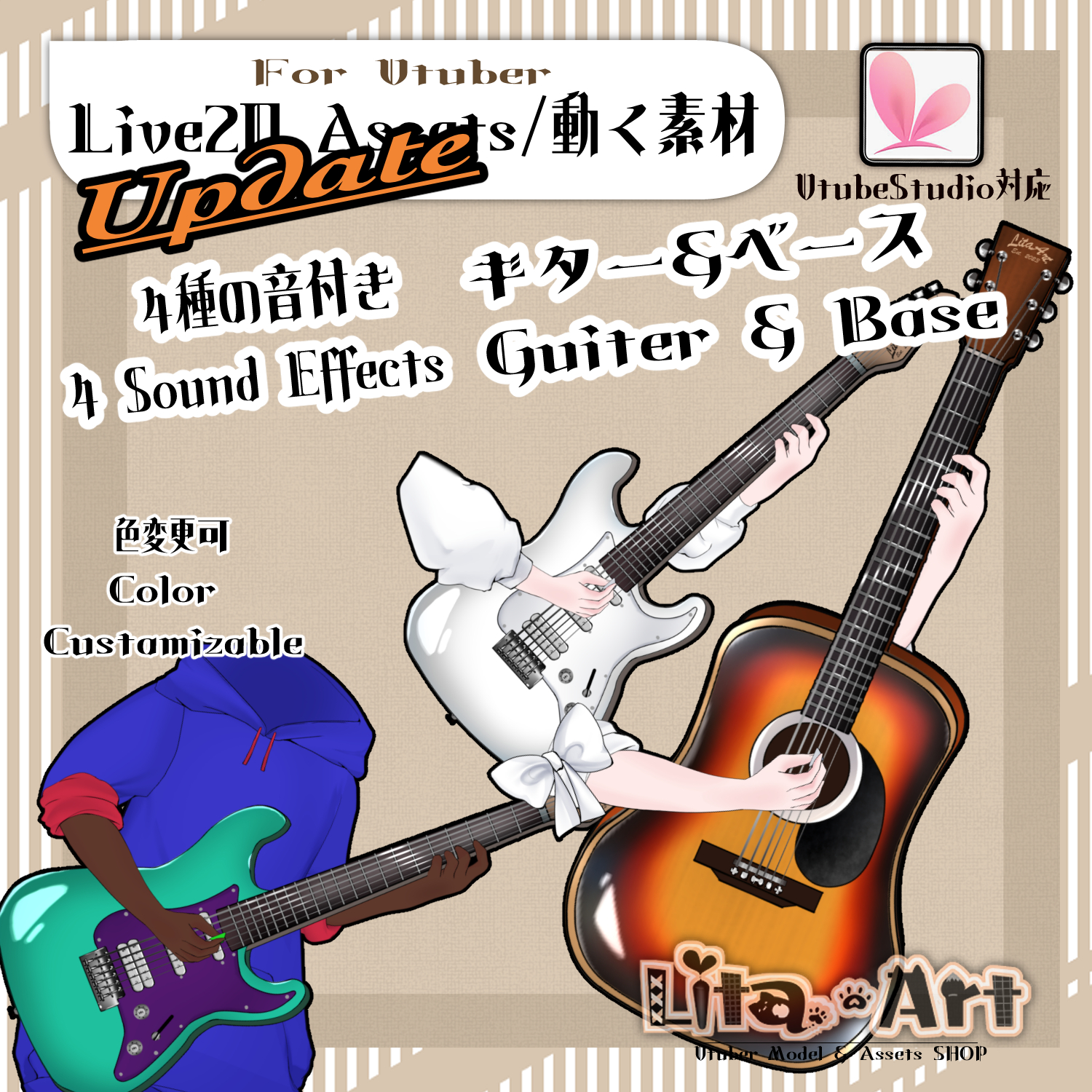
(093)音あり演奏できるギター素材/Playable Guitar Asset with Sound effects
Litaの作品を見つけてくれてありがとう!
Thanks for finding my work!
Preview Video
Download / Purchase
English Description
Playable Guitar Asset with Sound Effects is a Live2D asset for VTube Studio. Play with both hands or just your right hand, control individual fingers, and customize the guitar and outfit.
Update — April 19, 2026
Added motions with two guitar sounds, two bass sounds, and a silent idle animation that keeps both arms moving.
Sound Effects
Sound effects: Maou Damashii.
You can mute the sounds in VTube Studio. How to turn off sound effects
Custom Textures
texture_00 can be edited to change the guitar design to your liking. Enable Custom with Ctrl + 6.
Custom Texture Setup Tutorial (English)
Customizable Colors
Use the Expression Editor to adjust the parameters containing “Color”.
- Arm skin: SkinColor
- Guitar body: Color
- Inside of electric guitar: ElekiColor
- Pick: PickColor
- Sleeves: SleeveColor
- Full outfit: ClothColor
Included Files
・0919GuiterIllust.zip
・0919Guiter1.1.zip
・Sound effects
・Live2D item files
moc3 / model3.json / textures, etc.
*Can be used with VTube Studio / nizima LIVE.
Keybind Settings
Right Click: Play guitar animation (both hands)
Left Click: Play guitar with right hand only
A: Index finger
S: Middle finger
D: Ring finger
W: Pinky
B + 1: Bass sound 1
B + 2: Bass sound 2
G + 1: Guitar sound 1
G + 2: Guitar sound 2
Ctrl + 1: Electric guitar ON
Ctrl + 2: Sunburst color
Ctrl + 3: Pick OFF
Ctrl + 4: Green screen 1 ON (large)
Ctrl + 5: Green screen 2 ON (small)
Ctrl + 6: Custom ON
Ctrl + 8: Silent idle animation with both arms moving
Ctrl + 9: Idle animation OFF
Shift + 1: Outfit 1 ON
Shift + 2: Outfit 2 ON
Shift + 3: Default sleeves OFF
Shift + 4: Bandana ON
Shift + 5: Ribbon ON
Shift + 6: Change sleeves
Shift + 8: Right arm OFF
Shift + 9: Left arm OFF
Ctrl + 0: Reset expressions
日本語説明
VTube Studioで使える「音あり演奏できるギター素材」です。両手・右手のみの演奏や指の操作に対応し、ギターや衣装のカスタマイズも楽しめます。
2026年4月19日 更新
ギター2種類・ベース2種類の音付きモーションと、音無しで両腕を動かし続けるアイドリングを追加しました。
効果音について
効果音:魔王魂様の音源を使用させていただいております。
音なしで使いたい場合は、VTube Studio上で音を消して使用できます。効果音をオフにする設定方法
テクスチャのカスタマイズ
texture_00を編集して、ギターのデザインをお好みに変更できます。Ctrl+6でカスタムをONにしてください。
カスタムテクスチャ設定方法(日本語)
色変更について
表情ファイルエディターで、Colorと書かれたパラメータを調整できます。
- 腕色:SkinColor
- ギターの色:Color
- エレキの内側の色:ElekiColor
- ピックの色:PickColor
- 服そで:SleeveColor
- 服全体:ClothColor
内容物
・0919GuiterIllust.zip
・0919Guiter1.1.zip
・効果音
・Live2Dアイテム一式
moc3 / model3.json / texture など
※VTube Studio / nizima LIVEで使用できます。
キーバインド設定
右クリック:ギターを弾くアニメーション(両手)
左クリック:ギターを弾く(右手のみ)
A:人差し指
S:中指
D:薬指
W:小指
B+1:ベース音1
B+2:ベース音2
G+1:ギター音1
G+2:ギター音2
Ctrl+1:エレキON
Ctrl+2:サンバースト色
Ctrl+3:ピックOFF
Ctrl+4:グリーンバック1 ON(大きめ)
Ctrl+5:グリーンバック2 ON(小さめ)
Ctrl+6:カスタムON
Ctrl+8:音無しで両腕を動かし続けるアイドリング
Ctrl+9:アイドリングOFF
Shift+1:服1 ON
Shift+2:服2 ON
Shift+3:デフォルト袖OFF
Shift+4:バンダナON
Shift+5:リボンON
Shift+6:袖変更
Shift+8:右腕OFF
Shift+9:左腕OFF
Ctrl+0:表情リセット

Important Note
✅ Commercial use and editing are permitted.
✅ Credit is optional.
✅ Copyright is not waived.
✅ By using this product, you are deemed to have agreed to the Terms of Sale.
🔗 https://lita-art.net/terms-and-condition/
⚠️ There are no restrictions on use in adult-oriented / NSFW content.
Please use within the bounds of common sense.
Color Changes & Sound Effects
Some items support color changes and/or sound effects.
To change the color, adjust the “Color” parameter in the expression settings if available. If there is no “Color” parameter, change the color using the ArtMesh color settings.
Setup Guide:
🔗 https://lita-art.net/how-to-set-up/
Contact
Questions and consultations are accepted via DM.
Feel free to contact me ✨
X: https://twitter.com/LitaVtuber
Web: https://lita-art.net/contact-form/
ご利用について
✅ 商用利用・編集OK
✅ クレジット表記は任意
✅ 著作権は放棄していません
✅ ご利用の際は、利用規約に同意したものとみなします
🔗 https://lita-art.net/terms-and-condition/
⚠️ 成人向けコンテンツでの使用制限はありません。
常識の範囲内でご使用ください。
色変更・効果音について
一部のアイテムは、色変更や効果音に対応しています。
変更は、表情設定のパラメータ一覧に「Color」がある場合、その値を調整してください。「Color」がない場合は、アートメッシュの色設定から変更してください。
設定方法はこちら:
🔗 https://lita-art.net/how-to-set-up/
お問い合わせ
質問・ご相談はDMまでお気軽にどうぞ✨
X: https://twitter.com/LitaVtuber
Web: https://lita-art.net/contact-form/