
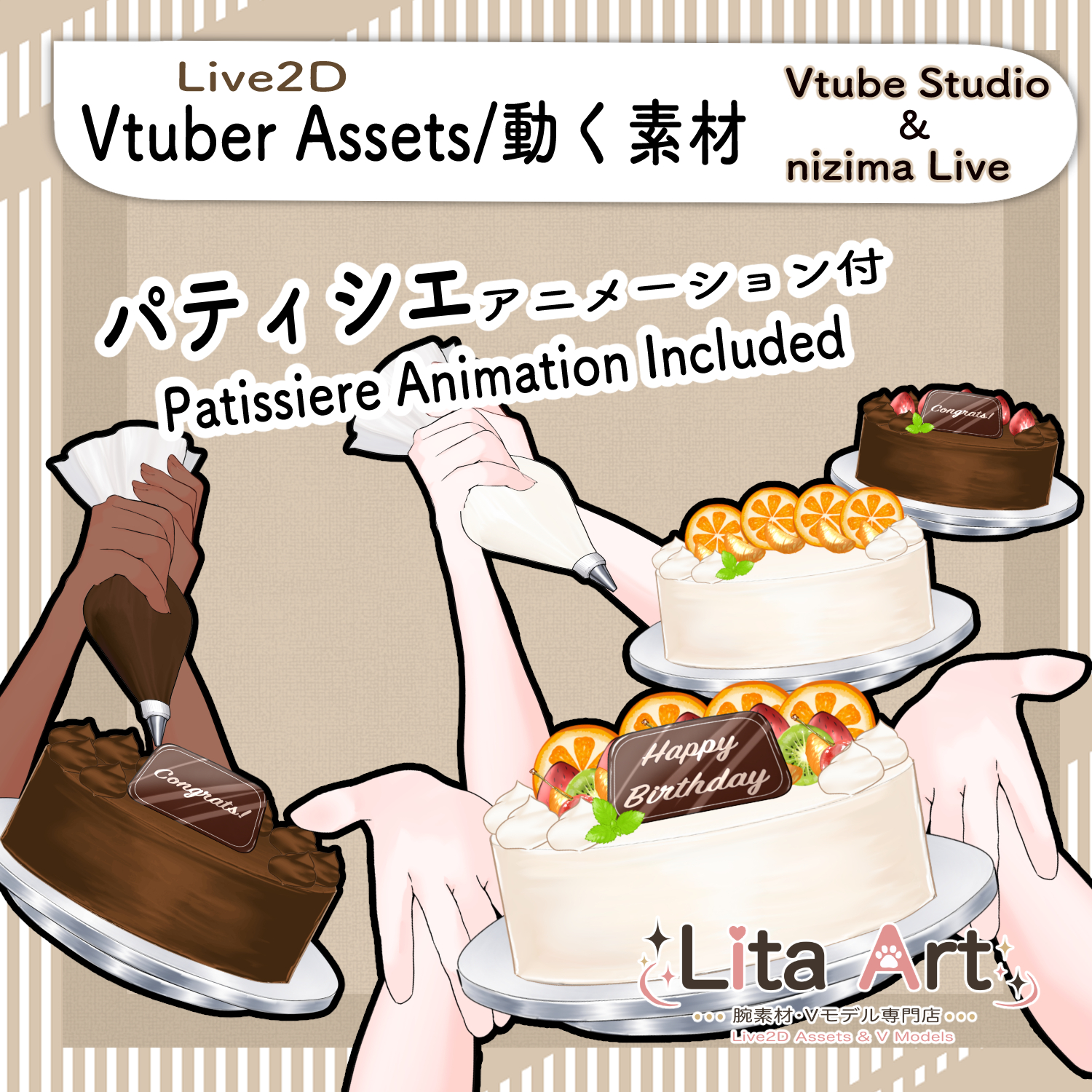
(132) パティシエになれる腕素材 / Become a Patissier Live2D Asset
Litaの作品を見つけてくれてありがとう!
Thanks for finding my work!
Preview Video
Download / Purchase
English Description
A Live2D item that can be added to your Vtuber stream.
This item lets your character decorate a cake with cream, fruits, chocolate, and custom text plates.
*Character model is not included.
Included Files
・Live2D item files
moc3 / model3.json / textures, etc.
*Can be used with VTube Studio / nizima Live.
Keybind Settings
Animation
After playing an animation, the display keybinds may not respond.
Before using the display keybinds, please reset once with [Shift+9].
When using this item in nizima Live, please also reset the display once with [Shift+0] before playing an animation.
🎮 [Shift+1] Cream & All Fruits
🎮 [Shift+2] Cream & Strawberry
🎮 [Shift+3] Cream & Orange
🎮 [Shift+4] Cream & Cherry & Kiwi
🎮 [Shift+5] Cream Only
🎮 [Shift+Q] Fruits
🎮 [Shift+W] Strawberry
🎮 [Shift+E] Orange
🎮 [Shift+R] Cherry & Kiwi
🎮 [Shift+9] Animation Reset
Display Keybinds Without Animation
🎮 [Shift+B] Show Cherry
🎮 [Shift+H] Show Kiwi
🎮 [Shift+J] Show Orange
🎮 [Shift+K] Show Strawberry
🎮 [Shift+M] Show Mint
🎮 [Shift+N] Show Mandarin Orange
🎮 [Shift+V] Show All Fruits
🎮 [Shift+L] Show Cream
🎮 [Shift+S] Change Chocolate
🎮 [Shift+A] Show Chocolate Plate
🎮 [Shift+D] Hand Mid
🎮 [Shift+F] Hand Low
🎮 [Shift+G] Hide Hand
🎮 [Shift+P] Hide Cake
🎮 [Shift+0] Expression Reset
Chocolate Plate Text / Customizable
🎮 [Ctrl+1] チャンネル登録して
🎮 [Ctrl+2] 誕生日おめでとう
🎮 [Ctrl+3] ありがとう
🎮 [Ctrl+4] おめでとう
🎮 [Ctrl+5] I Love You
🎮 [Ctrl+6] Thank You
🎮 [Ctrl+7] Congrats
🎮 [Ctrl+8] Happy Birthday
Custom Settings
This time, texture_00 can be customized.
How to set up custom textures:
English:
Color Options
Adjustable via Expression Parameters:
Arm Color(SkinColor)
日本語説明
Vtuberさんの配信画面に追加して使えるLive2Dアイテムです。
ケーキにクリームやフルーツ、チョコ、文字入りチョコプレートを表示して、配信画面を楽しく飾ることができます。
※キャラクターモデルは付属しません。
内容物
・Live2Dアイテム一式
moc3 / model3.json / texture など
※VTube Studio / nizima Liveで使用できます。
キーバインド設定
ーーーアニメーションーーー
アニメーション再生後は、表示用キーバインドが反応しない場合があります。
表示用キーバインドを使う前に、【Shift+9】で一度リセットしてください。
Nizimaでご使用の場合は、アニメーション前に【Shift+0】で表示リセットもお願いします。
🎮 【Shift+1】クリームとフルーツ全部
🎮 【Shift+2】クリームといちご
🎮 【Shift+3】クリームとオレンジ
🎮 【Shift+4】クリームとチェリー&キウイ
🎮 【Shift+5】クリームのみ
🎮 【Shift+Q】フルーツ
🎮 【Shift+W】いちご
🎮 【Shift+E】オレンジ
🎮 【Shift+R】チェリー&キウイ
🎮 【Shift+9】アニメーションリセット
アニメーションなしの表示用キーバインド
🎮 【Shift+B】チェリー表示
🎮 【Shift+H】キウイ表示
🎮 【Shift+J】オレンジ表示
🎮 【Shift+K】いちご表示
🎮 【Shift+M】ミント表示
🎮 【Shift+N】みかん表示
🎮 【Shift+V】フルーツ全部表示
🎮 【Shift+L】クリーム表示
🎮 【Shift+S】チョコ変更
🎮 【Shift+A】チョコプレート表示
🎮 【Shift+D】手(中)
🎮 【Shift+F】手(下)
🎮 【Shift+G】手非表示
🎮 【Shift+P】ケーキ非表示
🎮 【Shift+0】表情リセット
チョコプレートの文字 / カスタム可能
※Nizima Liveご使用の場合、使用環境によりCtrlキーが違うキーになっている可能性があります。
お好きに設定を変更して使用してください。
🎮 【Ctrl+1】チャンネル登録して
🎮 【Ctrl+2】誕生日おめでとう
🎮 【Ctrl+3】ありがとう
🎮 【Ctrl+4】おめでとう
🎮 【Ctrl+5】I Love You
🎮 【Ctrl+6】Thank You
🎮 【Ctrl+7】Congrats
🎮 【Ctrl+8】Happy Birthday
カスタム設定について
今回は、texture_00 がカスタム可能になっています。
表情パラメータで色変更可能箇所
腕色(SkinColor)

Important Note
✅ Commercial use and editing are permitted.
✅ Credit is optional.
✅ Copyright is not waived.
✅ By using this product, you are deemed to have agreed to the Terms of Sale.
🔗 https://lita-art.net/terms-and-condition/
⚠️ There are no restrictions on use in adult-oriented / NSFW content.
Please use within the bounds of common sense.
Color Changes & Sound Effects
Some items support color changes and/or sound effects.
For instructions on color changes and sound settings, please check the page below.
Setup Guide:
🔗 https://lita-art.net/how-to-set-up/
Contact
Questions and consultations are accepted via DM.
Feel free to contact me ✨
X: https://twitter.com/LitaVtuber
Web: https://lita-art.net/contact-form/
ご利用について
✅ 商用利用・編集OK
✅ クレジット表記は任意
✅ 著作権は放棄していません
✅ ご利用の際は、利用規約に同意したものとみなします
🔗 https://lita-art.net/terms-and-condition/
⚠️ 成人向けコンテンツでの使用制限はありません。
常識の範囲内でご使用ください。
色変更・効果音について
一部のアイテムは、色変更や効果音に対応しています。
色変更や効果音の設定方法は、下記ページをご確認ください。
設定方法はこちら:
🔗 https://lita-art.net/how-to-set-up/
お問い合わせ
質問・ご相談はDMまでお気軽にどうぞ✨
X: https://twitter.com/LitaVtuber
Web: https://lita-art.net/contact-form/