
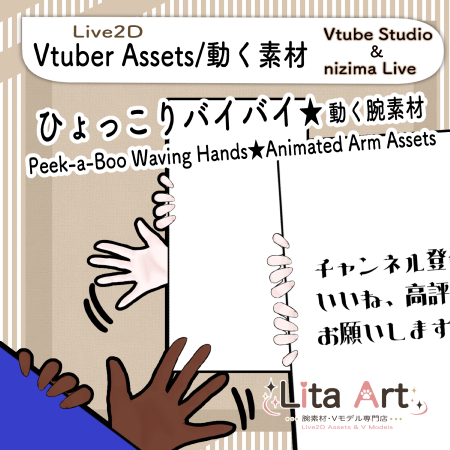
(138)ひょっこり・バイバイ腕素材 | Peek-a-boo Waving hands Live2D Assets
Litaの作品を見つけてくれてありがとう!
Thanks for finding my work!
Preview Video
Download / Purchase
English Description
A playful animated hand asset that peeks out from the edge of the screen and waves goodbye.
You can show the right or left hand from different positions, raise each hand, switch the door position, open or close the door, and hide individual elements.
Perfect for greetings, goodbyes, stream transitions, and cute reaction moments.
You can edit the Texture00 PNG file. Feel free to change the text to whatever you like.
Included Files
・Live2D item files
moc3 / model3.json / textures, etc.
*Can be used with VTube Studio / nizima Live.
Keybind Settings
🎮 [Shift+1] Right hand appears from the bottom
🎮 [Shift+2] Left hand appears from the bottom
🎮 [Shift+3] Raise the right hand
🎮 [Shift+4] Raise the left hand
🎮 [Shift+5] Hide the text
🎮 [Shift+8] Hide the left hand
🎮 [Shift+9] Hide the right hand
🎮 [Shift+W] Switch the door position
🎮 [Shift+E] Door Open
🎮 [Shift+R] Door Close
🎮 [Shift+Q] Left hand waving animation
🎮 [Shift+A] Right hand waving animation
🎮 [Shift+0] Reset
Adjustable Expression Parameters
・Color: Door color
・Skin Color: Arm color
About the Waving Animation
In VTube Studio, press [Shift+Q] or [Shift+A] to play the waving animation.
In nizima Live, the hand keeps waving while the button is held down.
After using the waving animation in nizima Live, press [Shift+S] to clear the motion before using other keybinds.
日本語説明
画面の端からひょっこり現れて、手を振ってバイバイする動く腕素材です。
右手・左手をそれぞれ表示したり、手を挙げたり、ドアの位置変更、扉の開閉、各パーツの非表示ができます。
配信のあいさつ、終了時、場面転換、かわいいリアクション演出などにおすすめです。
Texture00のPNGデータを編集可能です。
文字をお好きに変更してください。
内容物
・Live2Dアイテム一式
moc3 / model3.json / texture など
※VTube Studio / nizima Liveで使用できます。
キーバインド設定
🎮 【Shift+1】下から右手を表示
🎮 【Shift+2】下から左手を表示
🎮 【Shift+3】右手を挙げる
🎮 【Shift+4】左手を挙げる
🎮 【Shift+5】文字を非表示
🎮 【Shift+8】左手を非表示
🎮 【Shift+9】右手を非表示
🎮 【Shift+W】ドアの位置を切り替える
🎮 【Shift+E】扉を開く
🎮 【Shift+R】扉を閉じる
🎮 【Shift+Q】左手のバイバイアニメーション
🎮 【Shift+A】右手のバイバイアニメーション
🎮 【Shift+0】リセット
表情パラメータで変更可能なもの
・Color:ドアの色
・Skin Color:腕の色
バイバイアニメーションについて
VTube Studioでは【Shift+Q】または【Shift+A】でバイバイアニメーションを再生します。
nizima Liveでは、ボタンを押している間バイバイし続けます。
nizima Liveでバイバイアニメーションを使用したあとは、ほかのキーバインドを使う前に【Shift+S】でモーションをクリアしてください。

Important Note
✅ Commercial use and editing are permitted.
✅ Credit is optional.
✅ Copyright is not waived.
✅ By using this product, you are deemed to have agreed to the Terms of Sale.
🔗 https://lita-art.net/terms-and-condition/
⚠️ There are no restrictions on use in adult-oriented / NSFW content.
Please use within the bounds of common sense.
Color Changes & Sound Effects
Some items support color changes and/or sound effects.
To change the color, adjust the “Color” parameter in the expression settings if available. If there is no “Color” parameter, change the color using the ArtMesh color settings.
Setup Guide:
🔗 https://lita-art.net/how-to-set-up/
Contact
Questions and consultations are accepted via DM.
Feel free to contact me ✨
X: https://twitter.com/LitaVtuber
Web: https://lita-art.net/contact-form/
ご利用について
✅ 商用利用・編集OK
✅ クレジット表記は任意
✅ 著作権は放棄していません
✅ ご利用の際は、利用規約に同意したものとみなします
🔗 https://lita-art.net/terms-and-condition/
⚠️ 成人向けコンテンツでの使用制限はありません。
常識の範囲内でご使用ください。
色変更・効果音について
一部のアイテムは、色変更や効果音に対応しています。
変更は、表情設定のパラメータ一覧に「Color」がある場合、その値を調整してください。「Color」がない場合は、アートメッシュの色設定から変更してください。
設定方法はこちら:
🔗 https://lita-art.net/how-to-set-up/
お問い合わせ
質問・ご相談はDMまでお気軽にどうぞ✨
X: https://twitter.com/LitaVtuber
Web: https://lita-art.net/contact-form/