
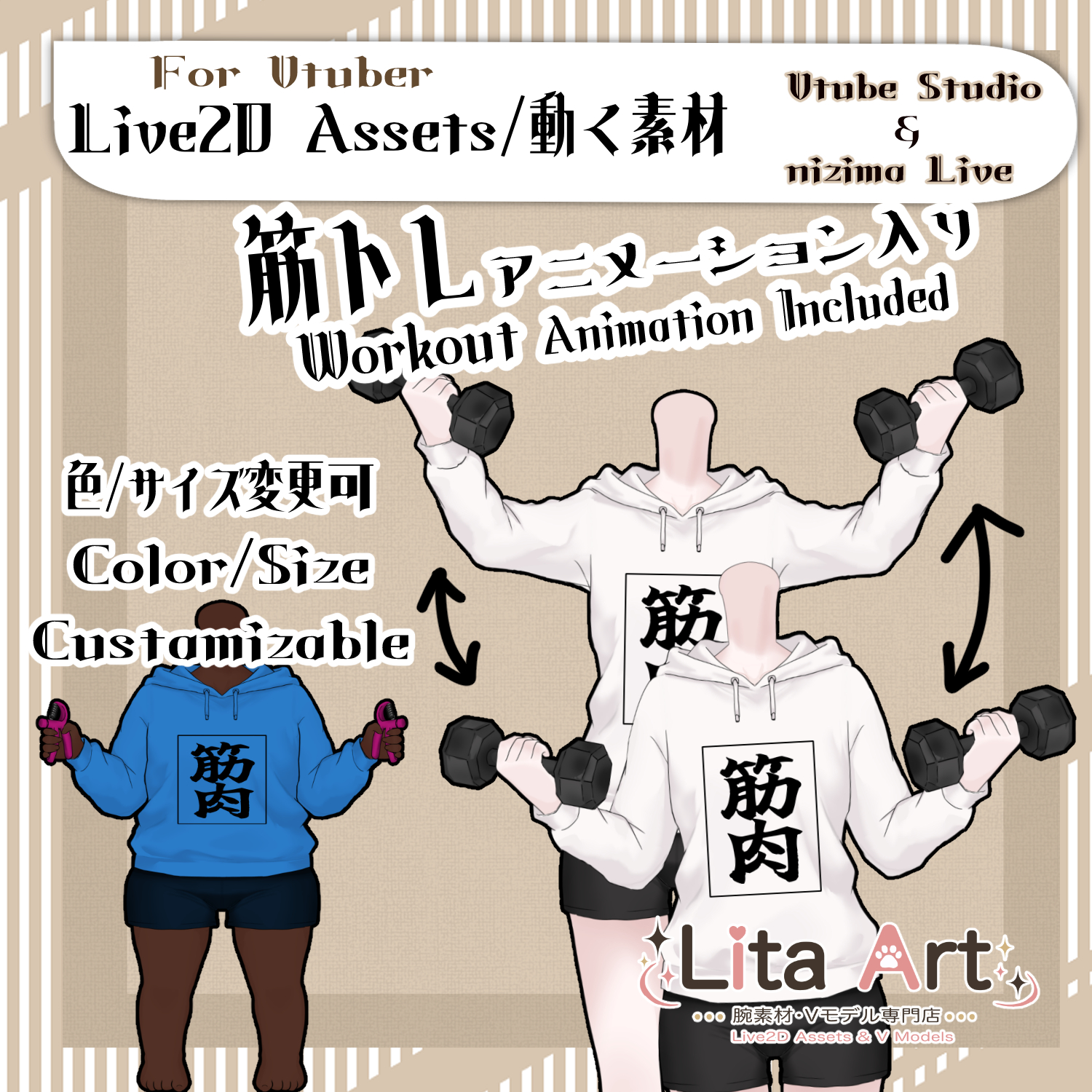
(129)筋トレ体素材/ Workout Body Vtuber Asset /
Litaの作品を見つけてくれてありがとう!
Thanks for finding my work!
“`html
Preview Video
Download / Purchase
English Description
A Live2D workout body asset for VTube Studio and nizima Live.
This item lets your Vtuber appear as if they are working out with an animated body, arm movement, grip motion, and customizable colors.
*Character model / face model is not included.
Included Files
・Live2D item files
moc3 / model3.json / textures, etc.
*Can be used with VTube Studio / nizima Live.
Important Tip
To attach the face to the body properly, please load your own model as an item.
Set the workout body as the main model, then load your own model as an item and attach it to the body.
If you are not sure how to do this, please watch the detailed setup guide linked below.
Keybind Settings
Note: When using nizima Live on Mac, use the Command key instead of Ctrl.
🎮 [Ctrl+1] Raise Arms
🎮 [Ctrl+2] Lower Arms
🎮 [Ctrl+3] Squeeze the Grip
🎮 [Ctrl+Q] Switch to Grip
🎮 [Ctrl+W] Hold Nothing
🎮 [Ctrl+0] Reset Held Item
🎮 [Alt+A] Change Body Size / Customizable
🎮 [Alt+S] Change Neck Size and Color / Customizable
🎮 [Alt+D] Turn on Green Screen / Customizable
Custom Settings
This time, texture_00 can be customized.
How to set up custom textures:
English:
Color Options
Adjustable via Expression Parameters:
Arm Color(SkinColor)
Prop Color(ToolColor)
Outfit Color(Color)
Setup Guide
日本語説明
VTube Studio / nizima Liveで使えるVtuber向けのLive2D素材です。
筋トレ中の体として使えるLive2Dアイテムで、腕を上げる、下げる、グリップを握るなどの動きができます。
※キャラクターモデル / 顔のモデルは付属しません。
内容物
・Live2Dアイテム一式
moc3 / model3.json / texture など
※VTube Studio / nizima Liveで使用できます。
とても大事なTIPS
うまく体に顔をくっつけるためには、自分のモデルをアイテムとしてロードしてください。
筋トレの体が主体のモデル、自分のモデル本体はアイテムとして呼び出して、体にくっつけてください。
よく意味がわからないよ!という方は、詳しい導入方法の動画をご参考にしてください。
キーバインド設定
※nizima LiveをMacで使用する場合は、CtrlがCommandキーになっています。
🎮 【Ctrl+1】腕を上げる
🎮 【Ctrl+2】腕を下げる
🎮 【Ctrl+3】グリップをにぎにぎする
🎮 【Ctrl+Q】グリップに変更
🎮 【Ctrl+W】何も持たない
🎮 【Ctrl+0】持ち物リセット
🎮 【Alt+A】体サイズ変更 / カスタム可能
🎮 【Alt+S】首サイズと色変更 / カスタム可能
🎮 【Alt+D】グリーンバックON / カスタム可能
カスタム設定について
今回は、texture_00 がカスタム可能になっています。
表情パラメータで色変更可能箇所
腕色(SkinColor)
小物の色(ToolColor)
服の色(Color)
導入方法

Important Note
✅ Commercial use and editing are permitted.
✅ Credit is optional.
✅ Copyright is not waived.
✅ By using this product, you are deemed to have agreed to the Terms of Sale.
🔗 https://lita-art.net/terms-and-condition/
⚠️ There are no restrictions on use in adult-oriented / NSFW content.
Please use within the bounds of common sense.
Color Changes & Sound Effects
Some items support color changes and/or sound effects.
For instructions on color changes and sound settings, please check the page below.
Setup Guide:
🔗 https://lita-art.net/how-to-set-up/
Contact
Questions and consultations are accepted via DM.
Feel free to contact me ✨
X: https://twitter.com/LitaVtuber
Web: https://lita-art.net/contact-form/
ご利用について
✅ 商用利用・編集OK
✅ クレジット表記は任意
✅ 著作権は放棄していません
✅ ご利用の際は、利用規約に同意したものとみなします
🔗 https://lita-art.net/terms-and-condition/
⚠️ 成人向けコンテンツでの使用制限はありません。
常識の範囲内でご使用ください。
色変更・効果音について
一部のアイテムは、色変更や効果音に対応しています。
色変更や効果音の設定方法は、下記ページをご確認ください。
設定方法はこちら:
🔗 https://lita-art.net/how-to-set-up/
お問い合わせ
質問・ご相談はDMまでお気軽にどうぞ✨
X: https://twitter.com/LitaVtuber
Web: https://lita-art.net/contact-form/