
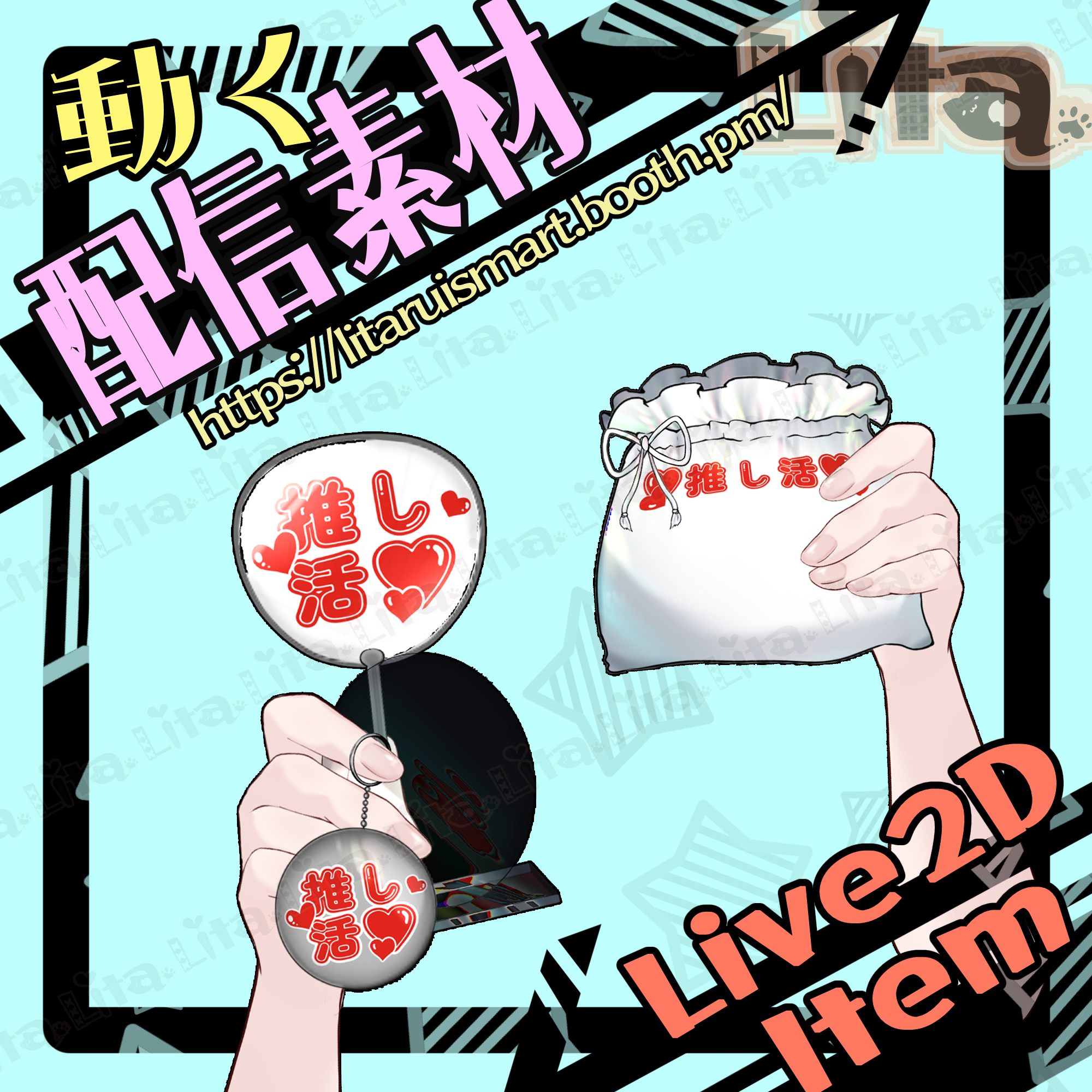
(091)推し活グッズ紹介素材/VTuber Merch Showcase Assets
Litaの作品を見つけてくれてありがとう!
Thanks for finding my work!
VtubeStudioで使える素材です。//Assets for VtubeStudio
☆★☆★☆★☆★☆★☆★☆★☆★☆
キーバインド設定//Keybind setting
キーバインド設定
🎮 【マウス真ん中クリック/Middle Mouse Click】ものを取りだす//Take out item
ーー袋//Bag ーー
🎮 【B + 1】カスタム1//Custom 1
🎮 【B + 2】推し活//Fan Support
🎮 【B + 3】リタの宣伝袋//Lita Promo Bag
🎮 【B + 4】はてなマーク//Question Mark
ーー形無しグッズ//No-form Goodsーー
🎮 【A + 1】カスタム1//Custom 1
🎮 【A + 2】カスタム2//Custom 2
🎮 【A + 3】赤いモザイクON//Red Mosaic ON
ーーキーホルダ//Keychain ーー
🎮 【K + 1】カスタム1//Custom 1
🎮 【K + 2】推し活//Fan Support
🎮 【K + 3】Litaの宣伝キーホルダー//Lita Promo Keychain
🎮 【K + 4】透明OFF(カスタム1と推し活の時に有効)//Transparency OFF (works with Custom 1 & Fan Support)
ーーうちわ//Uchiwa (Fan)ーー
🎮 【F + 1】カスタム1//Custom 1
🎮 【F + 2】推し活//Fan Support
ーーアクリルスタンド//Acrylic Standーー
🎮 【Q + 1】カスタム1//Custom 1
🎮 【Q + 2】Litaアクリル//Lita Acrylic
🎮 【Q + 3】丸い透明板ON//Round Transparent Plate ON
ーーーーーーーーーーーー
🎮 【Ctrl + 0】表情クリア//Reset Expression
ーーーーーーーーーーーー
ーーーーーーーーーーーー
※取扱のコツ※✨ Tips for Use ✨
デフォルトは全てカスタム1になっています。表情クリアをするとデフォルトに戻ります。
Default is always set to Custom 1. Clearing expressions resets to default.
グッズをオンにしてないと何も取り出してくれません。
グッズをオフにしないとずっとそれを取り出しますので、一つずつ取り出したい方は、
【グッズオン→取り出す→しまう→グッズオフ→違うグッズオン→取り出す】
というループがいいかと思います。
If items are not turned ON, nothing will come out.
If you don’t turn items OFF, the same one will keep appearing.
To showcase one at a time:
ON → Take out → Put away → OFF → Switch item ON → Take out
ーーー具体例ーーーーー
【Q+1 →真ん中クリック→真ん中クリック→Q+1→K+1→真ん中クリック】
アクリルカスタム1を見せて、袋にしまい、その後キーホルダーカスタム1だけを取り出す。
という動作にできます。
Example loop:
Q+1 → Middle Click → Middle Click → Q+1 → K+1 → Middle Click
= Show acrylic stand (Custom 1), put it away, then show only keychain (Custom 1).
ーーーーーーーーーーー
このループだと、ちゃんと物がオンになったかどうかは目視できません。
目視したい方は、一度取り出した状態にすればONOFF確認できます。
ややこしくてすみません。でもこれが一番グッズ紹介にいいかなと思ったので!
同時持ちもできますが一つずつにしたい場合はこのようにするといいかと思います!
This way, you can display items one by one.
If you want to confirm ON/OFF visually, keep an item out to check its state.
Sorry if it feels a bit complicated—but I think this works best for merch showcases!
☆★☆★☆★☆★☆★☆★☆★☆★☆★☆★☆★☆
今回は、texture_00 がカスタム可能になっています。
This time, texture_00 can be customized.
Feel free to change the design of the lottery box to your liking!
カスタム設定方法はこちら/How to set up custom textures
日本語 https://youtu.be/2YASoao3Phg?si=rKnwaCQY_RKe75uy
English https://youtu.be/JgQLLwoV4iU?si=RQnnBqioZrd36J83

Important Note
✅ Commercial use and editing are permitted.
✅ Credit is optional.
✅ Copyright is not waived.
✅ By using this product, you are deemed to have agreed to the Terms of Sale.
🔗 https://lita-art.net/terms-and-condition/
⚠️ There are no restrictions on use in adult-oriented / NSFW content.
Please use within the bounds of common sense.
Color Changes & Sound Effects
Some items support color changes and/or sound effects.
For instructions on color changes and sound settings, please check the page below.
Setup Guide:
🔗 https://lita-art.net/how-to-set-up/
Contact
Questions and consultations are accepted via DM.
Feel free to contact me ✨
X: https://twitter.com/LitaVtuber
Web: https://lita-art.net/contact-form/
ご利用について
✅ 商用利用・編集OK
✅ クレジット表記は任意
✅ 著作権は放棄していません
✅ ご利用の際は、利用規約に同意したものとみなします
🔗 https://lita-art.net/terms-and-condition/
⚠️ 成人向けコンテンツでの使用制限はありません。
常識の範囲内でご使用ください。
色変更・効果音について
一部のアイテムは、色変更や効果音に対応しています。
色変更や効果音の設定方法は、下記ページをご確認ください。
設定方法はこちら:
🔗 https://lita-art.net/how-to-set-up/
お問い合わせ
質問・ご相談はDMまでお気軽にどうぞ✨
X: https://twitter.com/LitaVtuber
Web: https://lita-art.net/contact-form/