
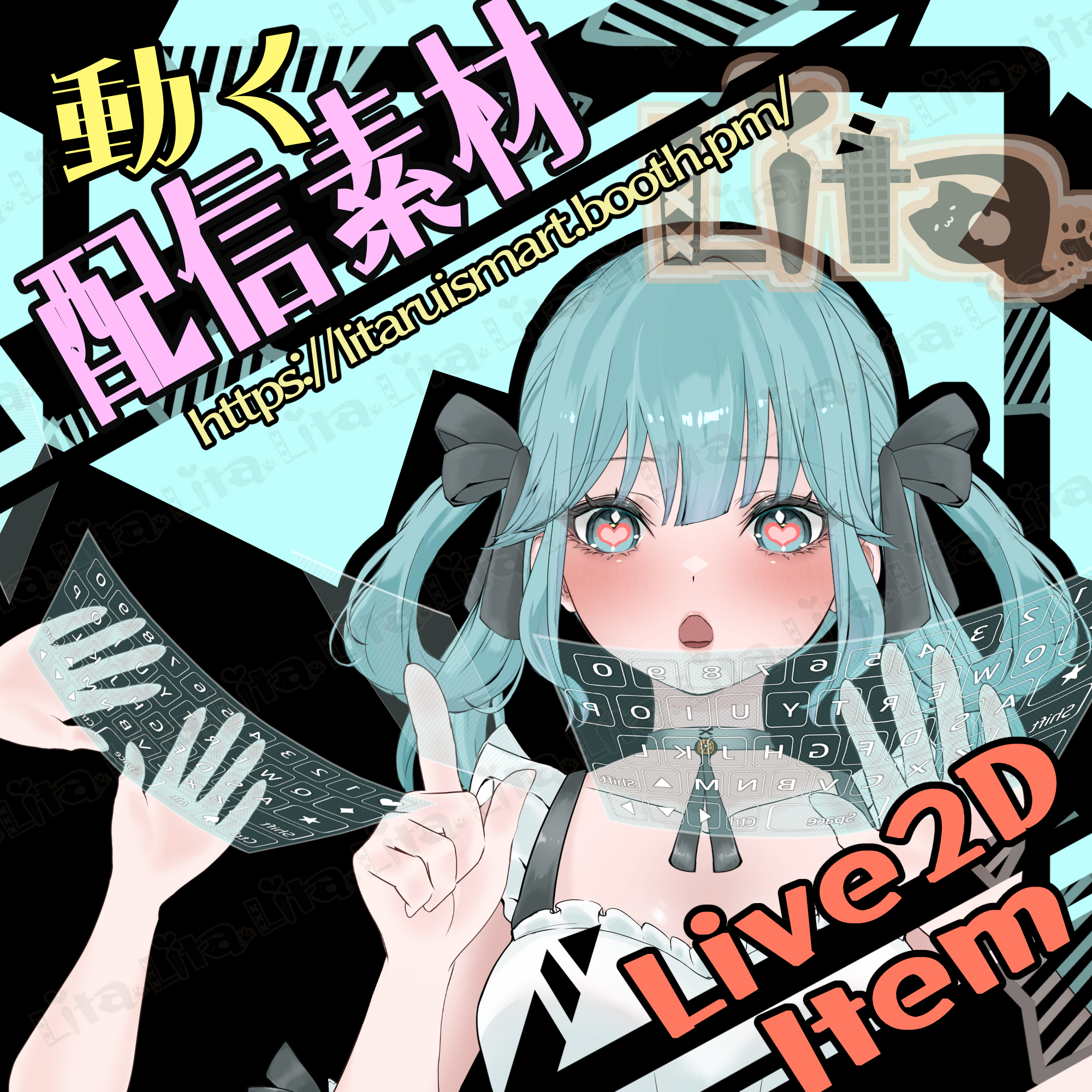
(082) ホログラフィックキーボード/Holographic Keyboard
Litaの作品を見つけてくれてありがとう!
Thanks for finding my work!
VtubeStudioで使える素材です。//Assets for VtubeStudio
☆★☆★☆★☆★☆★☆★☆★☆★☆
キーバインド設定//Keybind setting
キーバインド可能なキーをほぼ全て紐づけてあります。
⭐︎❤️♦️ は指設定はありますが、何にも紐づけておりません。お好きにカスタマイズしてもらってもいいです。
TabキーやCapキーがキーバインドとして設定できなかったので溢れたキーです。
Most keyboard keys are already mapped for keybinds.
The ⭐︎❤️♦️ keys have finger animations but are not mapped to any keys by default—feel free to customize them however you like.
Note: Tab and Caps Lock could not be set as keybinds, so those are “overflow” keys.
クリックは、左クリックのみクリックのアニメーションが発動します。
Click animation:Only left click triggers the click animation.
🎮 【マウスミドルクリック】マウスポジションに変更(右手がマウスに固定され、左手で全てのキーを押す設定になります。)
🎮 【Middle Mouse Click】 Move to mouse position (right hand locks to mouse , left hand can press all keys)
🎮 【Ctrl+ マウスミドルクリック】キーボードオフ(腕も非表示になります。)
🎮 【Ctrl + Middle Mouse Click】Turn keyboard off (arms will also be hidden)
🎮 【Ctrl+1】カスタム1//Custom 1
🎮 【Ctrl+ 2】カスタム2//Custom 2
🎮 【Ctrl+ 0】表情クリア//Reset Expression
お好きな絵をキーボードに設定してください⭐︎
透明度の設定もできます。透明度のパラメータの名前は、CustomTrans です。
編集方法は前回と同じ方法でできますので、説明動画を乗せておきます。
今回は、texture_00 がカスタム可能になっています。
You can also adjust opacity using the parameter CustomTrans.
Please refer to the previous method/video for editing. This time, texture_00 is customizable.
日本語 https://youtu.be/2YASoao3Phg?si=rKnwaCQY_RKe75uy
English https://youtu.be/JgQLLwoV4iU?si=RQnnBqioZrd36J83
☆★☆★☆★☆★☆★☆★☆★☆★☆★☆★☆★☆
Important Note
✅ Commercial use and editing are permitted.
✅ Credit is optional.
✅ Copyright is not waived.
✅ By using this product, you are deemed to have agreed to the Terms of Sale.
🔗 https://lita-art.net/terms-and-condition/
⚠️ There are no restrictions on use in adult-oriented / NSFW content.
Please use within the bounds of common sense.
Color Changes & Sound Effects
Some items support color changes and/or sound effects.
For instructions on color changes and sound settings, please check the page below.
Setup Guide:
🔗 https://lita-art.net/how-to-set-up/
Contact
Questions and consultations are accepted via DM.
Feel free to contact me ✨
X: https://twitter.com/LitaVtuber
Web: https://lita-art.net/contact-form/
ご利用について
✅ 商用利用・編集OK
✅ クレジット表記は任意
✅ 著作権は放棄していません
✅ ご利用の際は、利用規約に同意したものとみなします
🔗 https://lita-art.net/terms-and-condition/
⚠️ 成人向けコンテンツでの使用制限はありません。
常識の範囲内でご使用ください。
色変更・効果音について
一部のアイテムは、色変更や効果音に対応しています。
色変更や効果音の設定方法は、下記ページをご確認ください。
設定方法はこちら:
🔗 https://lita-art.net/how-to-set-up/
お問い合わせ
質問・ご相談はDMまでお気軽にどうぞ✨
X: https://twitter.com/LitaVtuber
Web: https://lita-art.net/contact-form/